> For the complete documentation index, see [llms.txt](https://docs.fluxbeam.xyz/llms.txt). Markdown versions of documentation pages are available by appending `.md` to page URLs; this page is available as [Markdown](https://docs.fluxbeam.xyz/fluxtools-tutorials/pool-creation.md).
# Pool Creation
Liquidity is important. Without it, your token can’t be traded. Let’s put it this way. If you aim for your token (base token liquidity) to have at least $10k in liquidity, you'll need a minimum of $5k
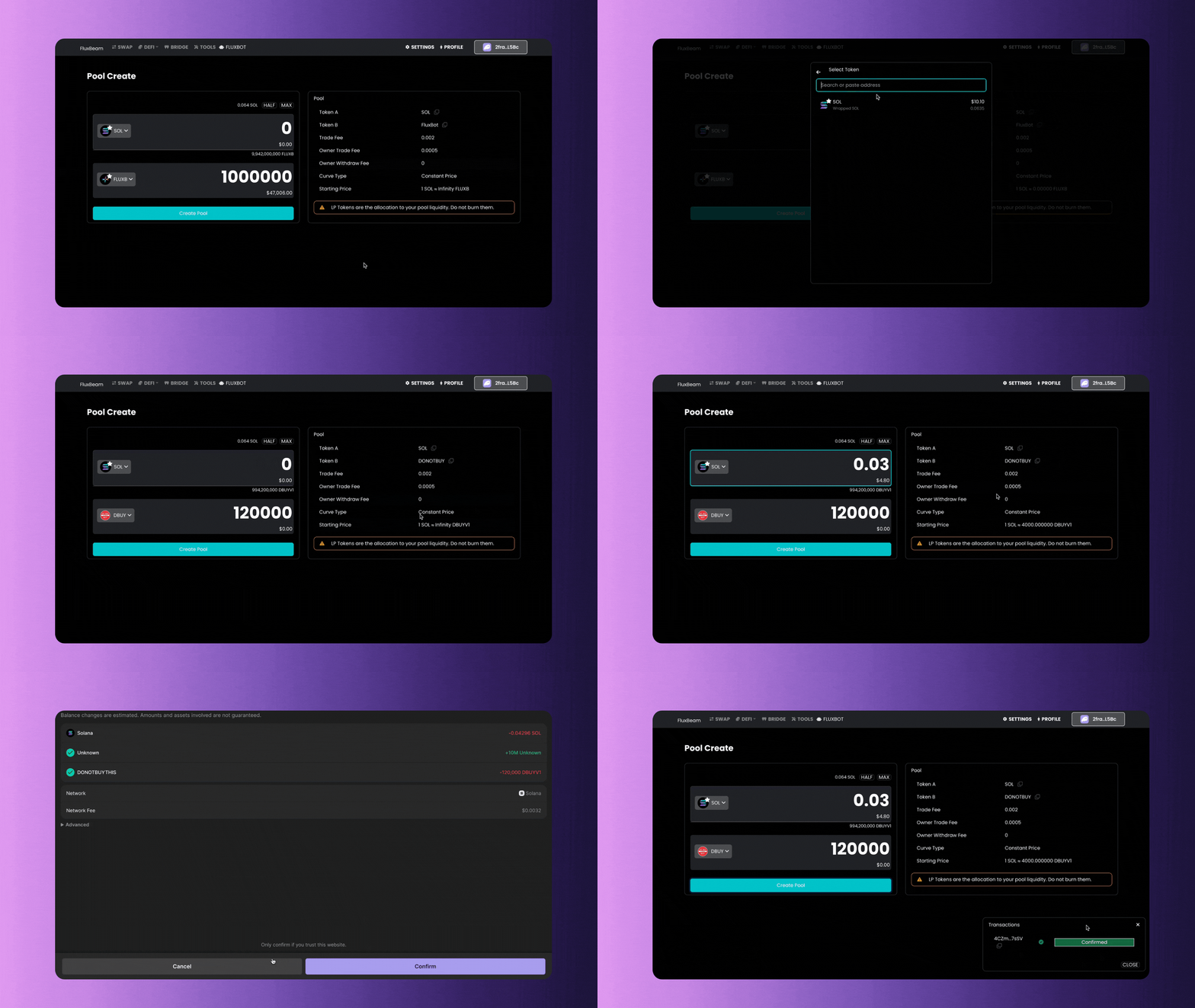
1. Go to [Pool Create](https://fluxbeam.xyz/app/pools/create) and make sure you connect your wallet.
2. Decide on the *initial liquidity requirement.*
3. Determine the amount of a compatible token to add to the liquidity pool
4. Check the overview on the right-hand side, which displays details such as the *tokens involved, fees, and the initial price for the created token.*
5. Review the information and ensure it meets your needs.
6. If satisfied, proceed by clicking on the *"create pool"* button.
{% hint style="info" %} **IMPORTANT NOTE**: LP Tokens represent the allocation to your pool liquidity. You can either lock them using a token locker or send them to an off-curve wallet address. Do not burn them.
Fluxbeam provides a token locker in the Fluxbeam Dex Tooling.
{% endhint %}